
When leads get lost in messaging apps, sales managers track clients in their own spreadsheets, and management only learns how sales went at the end of the month, a business starts looking for a CRM. Almost immediately, it faces a choice: sign up for an off-the-shelf cloud system on a subscription or commission a custom one. To make that choice, you need to understand what each option costs not in the first month, but over a horizon of several years.
At Studio Nomad, we build CRM, WMS, and automation systems around the processes of a specific company. In this article, we explain what goes into the cost of CRM development, when a custom system is more cost-effective than an off-the-shelf one, and how to avoid overpaying at the start.
In short: how much CRM development costs
Developing a custom CRM at Studio Nomad costs from 1,500,000 ₸. That amount covers a system for one line of business: clients, deals and the sales pipeline, tasks, employee roles, basic reports, and one or two integrations. Systems with inventory, document management, and finance modules and complex integrations are estimated after a process analysis — at that point, these are ERP- or WMS-level projects, and they cost considerably more.
Off-the-shelf cloud CRMs use a different payment model: you pay a subscription for each user or for a plan with limitations, and setup and customizations are often ordered separately from an integrator.
Three paths to a CRM and how you pay for each
| Option | How you pay | Time to launch | Flexibility |
|---|---|---|---|
| Cloud CRM “as is” | Monthly per-user subscription | Days | Within the platform’s capabilities and plan |
| Cloud or on-premise CRM with customizations | Subscription or license plus integrator services | Weeks | Moderate: customizations are limited by the platform’s architecture |
| Custom CRM | One-time development, then support and further development | Months; can be launched module by module | Full: the system mirrors your processes |
What goes into the cost of CRM development
Process analysis and requirements specification
This is the first and most important stage. We examine how leads, deals, shipments, and payments currently flow, who is responsible for what, and which reports management needs. Without this, a CRM turns into a digital copy of chaos. A well-developed specification reduces rework and makes the estimate predictable.
System modules
The cost depends directly on the number of modules and the depth of their logic. A typical set includes:
- clients and contacts — profiles, interaction history, segments;
- deals and pipeline — sales stages, reasons for lost deals, plan vs. actual;
- tasks and reminders — so that no lead goes unanswered;
- warehouse and stock — batches, series, expiration dates, transfers;
- documents — contracts, invoices, and completion certificates generated from templates;
- finance — payments, outstanding balances, charges;
- reports and analytics — real-time dashboards for management.
Roles and access rights
A sales manager sees their own clients, a department head sees the whole department, an accountant sees payments, and a partner sees only their own orders. The more complex the company’s structure and the more branches it has, the more work goes into permissions and data separation.
Integrations
A CRM rarely works in isolation. Typical integrations in Kazakhstan include 1C and other accounting systems, the website and lead forms, Kaspi, IP telephony, WhatsApp and Telegram, email, and banks. Each integration is a separate task with its own documentation, testing, and error handling. If you need to connect an existing website to a CRM or 1C, this can be done as a separate service — Kaspi and 1C integration costs from 150,000 ₸.
Data migration
The client base, deal history, and product catalogs usually live in spreadsheets or a legacy system. They need to be cleaned up, brought to a single format, and imported. The amount of work depends on the quality of the source data: duplicate clients, inconsistent phone number formats, and empty fields have to be dealt with before the import.
Mobile access
Field staff, couriers, and warehouse workers need a convenient interface on a phone or a data collection terminal. A responsive web version is cheaper than a separate mobile app, and for many tasks it is enough.
Implementation and training
A system only pays off if people actually use it. That is why the project includes a trial run, staff training, and adjustments based on feedback from the first few weeks.
How much a CRM costs at different scales
CRM for a sales department — from 1,500,000 ₸
Clients, deals, pipeline, tasks, roles for sales managers and their head, sales reports, lead capture from the website, and integration with telephony or messaging apps. A system like this solves the core pain point: lost leads and a lack of control over sales.
CRM with operational modules
On top of sales, the system adds inventory, documents, finance, work with partners and branches, and data exchange with 1C. The cost depends on the number of modules and integrations and is calculated individually after a process analysis. It is in projects like these that a custom system usually wins over an off-the-shelf one: the processes are too specific for standard settings.
Enterprise system at the ERP or WMS level
Management of warehouse logistics, a dealer network, or production; integration with corporate accounting systems; dozens of roles; and high reliability requirements. These are large projects developed in stages, with a separate estimate for each stage.
Custom CRM or Bitrix24 and amoCRM: which is more cost-effective
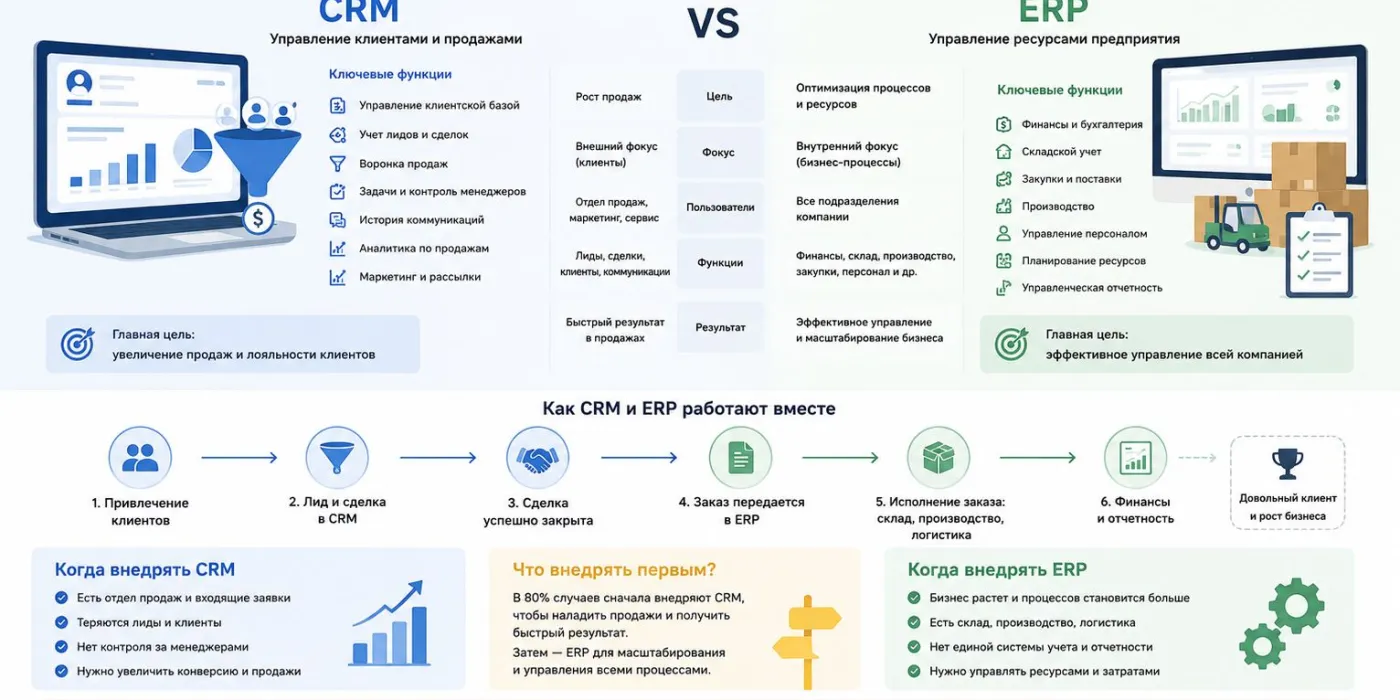
Popular cloud CRMs such as Bitrix24 and amoCRM are a good choice for getting started: they are quick to set up, they offer many ready-made features, and the monthly fee for a small team is modest. But as the company grows, the picture changes.
When an off-the-shelf CRM is enough
- the sales team is just a few people, and the process is standard: lead, call, deal;
- you don’t need complex integrations or custom reports;
- the business is only testing how it will work with a CRM, and its processes are still changing.
When a custom system is more cost-effective
- Many users. A subscription grows along with your team, while a custom system has no fee for each new employee.
- Non-standard processes. Inventory with batches and expiration dates, rentals, a dealer network, production — anything you have to “squeeze” into deals and pipelines in an off-the-shelf CRM.
- Complex integrations. Accounting systems, corporate ERP, your own websites and apps.
- Control over data. The system and its database run on a server you choose yourself. This matters given Kazakhstan’s legal requirements for storing personal data.
- No dependence on a platform. Changes to pricing plans, limits, or terms of service do not affect your operations.
How to compare costs fairly
Compare not the cost of the first month, but the total cost over three to five years. For an off-the-shelf CRM, that means the subscription for all users over the entire period plus implementation and customization by an integrator. For a custom system, it means development, hosting, support, and further development. It often turns out that a subscription is cheaper for a team of a few people, while a custom system is cheaper for a company with dozens of users and non-standard processes.
Examples of our projects
Here are several systems we have built from scratch around our clients’ processes:
- CRM for the AK ZHOL PHARM pharmacy chain — inventory tracking for each pharmacy, batches, series, and expiration dates, sales, requests, and work with B2B partners. Read more in the AK ZHOL PHARM CRM case study.
- CRM for rental property management — properties and tenants, leases and lease terms, automatic charges, tracking of outstanding balances, and real-time reporting.
- WMS for KAZMINERALS — a warehouse logistics management system: multiple warehouses, bin-location storage, receiving, stocktaking and shipping, barcode scanner support, and integration with the corporate ERP.
- DMS for Kia Kazakhstan — a dealer network management system: unified lead processing, sales monitoring, and analytics for the head office.
Development timeline
The first working version of a CRM for a single department can usually be launched within a few months. Systems with multiple modules and integrations take longer to develop and are almost always built in stages: first the module that delivers the greatest impact, then the rest. This way, the company starts using the system sooner, and the following modules are designed with employees’ real experience in mind.
Three things affect the timeline most: how quickly the company signs off on processes and mockups, how many integrations need to be built, and how ready the data is for migration. If the client appoints a person in charge in advance and that person has time for the project, the system launches noticeably faster.
How to reduce costs and risks
- Start with an MVP. Launch the core of the system — clients, deals, tasks — and expand it as needed.
- Automate the bottlenecks. Don’t move everything into the CRM at once: start with the processes where money and time are being lost.
- Don’t duplicate your accounting system. If your accounting is done in 1C, the CRM should exchange data with it rather than replicate its functions.
- Plan for growth. Businesses change, and the system should change with them. The architecture should allow new modules to be added without rebuilding what already exists.
- Spread out the payments. Development can be paid for in installments: we offer an installment plan of up to 12 months with no banks and no extra charges.
Questions to ask a developer
Before signing a CRM development contract, ask the contractor:
- whether they have similar projects and whether you can see how those systems work;
- who will analyze your processes and in what form you will receive the requirements specification;
- whether the estimate is broken down into stages and modules, and whether the system can be launched in parts;
- who owns the source code and the database once the work is complete;
- which server the system will run on and who is responsible for backups;
- what the warranty covers and how much further development of the system will cost after launch.
The answers to these questions will tell you more about a contractor than the total in their proposal.
What happens after launch
After handing over the system, we provide a warranty and free technical support for 24 months: we fix bugs, update components, and monitor stability. New modules and enhancements are estimated separately. The source code and data stay with you — one of the main advantages of having your own system.
Frequently asked questions
Can we switch to a custom CRM from Bitrix24 or amoCRM?
Yes. We migrate clients, deals, and history, set up integrations, and run the new system in parallel with the old one so the transition happens without interrupting sales.
Can we customize an off-the-shelf CRM instead of building our own?
Yes, if the customizations are minor. But as the changes pile up, their cost and the complexity of updates grow, and a custom system turns out to be simpler and cheaper to develop further.
Where will a custom CRM run?
On a server of your choice: with a hosting provider in Kazakhstan, in the cloud, or on the company’s own hardware. We help choose a configuration that fits the load and security requirements.
Do you need a CRM if you already have 1C?
1C handles record-keeping: stock, documents, bookkeeping. A CRM handles work with clients and sales. They usually work together: the CRM sends orders to 1C and receives stock levels, prices, and payment statuses from it.
Want to understand what kind of system your business needs and how much it will cost? Describe your processes and goals on the CRM development and business automation page — we will review them and propose an architecture and a phased plan with a budget. Studio Nomad is an in-house team in Almaty, working under contract, with a 24-month warranty.

'%3e%3cpath%20d='M25%200C11.195%200%200%2011.195%200%2025C0%2038.805%2011.195%2050%2025%2050C38.805%2050%2050%2038.805%2050%2025C50%2011.195%2038.805%200%2025%200ZM25.5299%2039.5557C25.5295%2039.5557%2025.5302%2039.5557%2025.5299%2039.5557H25.5238C23.0194%2039.5546%2020.5585%2038.9267%2018.3731%2037.735L10.4412%2039.8151L12.5641%2032.0637C11.2545%2029.7955%2010.5656%2027.2221%2010.5667%2024.5857C10.5701%2016.3383%2017.2825%209.62868%2025.5299%209.62868C29.5322%209.6302%2033.2893%2011.1881%2036.1141%2014.0152C38.9393%2016.8427%2040.4942%2020.6009%2040.4926%2024.5975C40.4892%2032.8453%2033.7761%2039.5557%2025.5299%2039.5557Z'%20fill='%23BB6BD9'/%3e%3cpath%20d='M25.5348%2012.1553C18.6748%2012.1553%2013.0958%2017.732%2013.0928%2024.587C13.092%2026.9361%2013.7497%2029.2238%2014.9944%2031.2032L15.29%2031.6736L14.0335%2036.2615L18.7404%2035.0271L19.1948%2035.2964C21.104%2036.4293%2023.2929%2037.0286%2025.5245%2037.0294H25.5295C32.3841%2037.0294%2037.9631%2031.4523%2037.9661%2024.5969C37.9673%2021.2747%2036.6749%2018.1512%2034.3269%2015.8014C31.979%2013.4515%2028.8563%2012.1564%2025.5348%2012.1553ZM32.8499%2029.9321C32.5382%2030.8049%2031.0447%2031.6018%2030.3264%2031.7094C29.6821%2031.8055%2028.8673%2031.8456%2027.9716%2031.5614C27.4284%2031.389%2026.7322%2031.159%2025.84%2030.774C22.0897%2029.1551%2019.6403%2025.3801%2019.4534%2025.1306C19.2665%2024.8811%2017.9268%2023.1038%2017.9268%2021.264C17.9268%2019.4246%2018.8926%2018.5201%2019.2352%2018.1463C19.5781%2017.772%2019.9833%2017.6786%2020.2324%2017.6786C20.4815%2017.6786%2020.7309%2017.6809%2020.9488%2017.6915C21.1784%2017.703%2021.4866%2017.6042%2021.7899%2018.3332C22.1016%2019.0816%2022.8492%2020.9211%2022.9427%2021.108C23.0362%2021.2953%2023.0983%2021.5135%2022.974%2021.763C22.8492%2022.0125%2022.435%2022.5507%2022.0394%2023.0413C21.8734%2023.2469%2021.6572%2023.43%2021.8754%2023.8042C22.0932%2024.1781%2022.8439%2025.4022%2023.9551%2026.3932C25.3834%2027.6666%2026.588%2028.061%2026.9619%2028.2483C27.3353%2028.4353%2027.5535%2028.404%2027.7717%2028.1549C27.9896%2027.9054%2028.7063%2027.0635%2028.9554%2026.6893C29.2045%2026.315%2029.454%2026.3776%2029.7966%2026.5023C30.1395%2026.6267%2031.9774%2027.5312%2032.3513%2027.7181C32.7251%2027.9054%2032.9742%2027.9989%2033.0677%2028.1549C33.1615%2028.3109%2033.1615%2029.059%2032.8499%2029.9321Z'%20fill='%23BB6BD9'/%3e%3c/g%3e%3cdefs%3e%3cclipPath%20id='clip0_1_39'%3e%3crect%20width='50'%20height='50'%20fill='white'/%3e%3c/clipPath%3e%3c/defs%3e%3c/svg%3e)


'%3e%3cpath%20d='M20.4968%202.26172H3.50552C2.81834%202.26172%202.26172%202.81834%202.26172%203.50414V20.4954C2.26172%2021.1812%202.81834%2021.7378%203.50552%2021.7378H20.4954C21.1812%2021.7378%2021.7378%2021.1812%2021.7378%2020.4954V3.50414C21.7392%202.81696%2021.1826%202.26172%2020.4968%202.26172ZM18.4174%2014.1294C18.7733%2014.4922%2019.5457%2015.101%2019.4055%2015.7209C19.2763%2016.2899%2018.427%2016.0823%2017.6024%2016.1153C16.6609%2016.1552%2016.1029%2016.1758%2015.5367%2015.7209C15.2701%2015.5051%2015.1134%2015.2495%2014.8578%2014.9636C14.6255%2014.7052%2014.3328%2014.242%2013.9342%2014.2599C13.2181%2014.2956%2013.4422%2015.2934%2013.1879%2015.9737C9.20775%2016.6005%207.60937%2014.1417%206.19927%2011.7558C5.51621%2010.6%204.52942%208.11788%204.52942%208.11788L7.34412%208.10826C7.34412%208.10826%208.24707%209.75063%208.48621%2010.1739C8.68962%2010.534%208.91364%2010.8199%209.14453%2011.1415C9.33832%2011.4081%209.6448%2011.9304%209.98015%2011.8878C10.5258%2011.8177%2010.6247%209.70115%2010.2866%208.99198C10.1519%208.70474%209.82897%208.60441%209.495%208.50683C9.60769%207.79491%2012.6519%207.64648%2013.1439%208.19897C13.8586%209.0016%2012.6492%2011.2363%2013.6277%2011.8878C15.0021%2011.1676%2016.1758%208.15224%2016.1758%208.15224L19.4715%208.17286C19.4715%208.17286%2018.9561%209.80285%2018.416%2010.5258C18.1013%2010.9491%2017.0567%2011.8919%2017.098%2012.5914C17.131%2013.1453%2017.9803%2013.6841%2018.4174%2014.1294Z'%20fill='%23A4A4A4'/%3e%3c/g%3e%3cdefs%3e%3cclipPath%20id='clip0_62_519'%3e%3crect%20width='19.4761'%20height='19.4761'%20fill='white'%20transform='translate(2.26172%202.26172)'/%3e%3c/clipPath%3e%3c/defs%3e%3c/svg%3e)